Epfo login
Logging into the Employees' Provident Fund Organisation (EPFO) portal is a straightforward process, but it does require a few specific details like your UAN (Universal Account Number) and a registered mobile phone for security.
Think of your UAN as a "permanent address" for all your different PF accounts from various jobs—it stays the same even when you switch companies.
These links go to the official epfindia.gov.in portals. Always check for .gov.in before entering your UAN or password.
Step 1: Visit the Official Portal
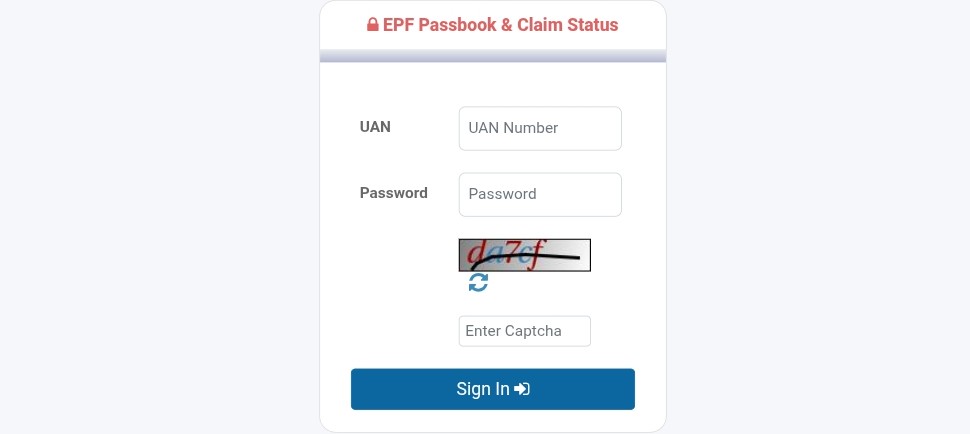
Go to the official EPFO Member e-Sewa Portal .
- Tip: Always ensure you are on the official .gov.in website to keep your data secure.
Step 2: Enter Your Credentials
On the right side of the homepage, you will see a login box. Enter the following:
- UAN: Your 12-digit Universal Account Number.
- Password: The password you created during activation.
- Captcha: Type the characters exactly as shown in the image.
Step 3: Two-Factor Authentication (OTP)
Once you click "Sign In," a One-Time Password (OTP) will be sent to your Aadhaar-linked mobile number.
- Enter the OTP on the screen.
- Click "Submit" to complete the login.
Important: If You Haven’t Activated Your UAN Yet
You cannot log in until your UAN is activated. As of 2025-2026, the EPFO has updated this process:
- Download the UMANG App: Activation is now primarily done through the UMANG app using Aadhaar-based Face Authentication (FAT).
- Process: In the app, go to EPFO Services > UAN Activation, and follow the prompts for face scanning. Once successful, you will receive a temporary password via SMS to log in for the first time.
Check Your Balance Without Logging In
If you can't log in right now, you can still check your PF balance from your UAN-registered mobile number — no password needed:
Missed call: Give a missed call to 9966044425
SMS: Send EPFOHO UAN to 7738299899
Both require your mobile number to be linked to your UAN with KYC completed. Balance details arrive by SMS.
Quick Troubleshooting
- Forgot Password? Click the "Forgot Password" link on the login page. You’ll need your UAN and access to your Aadhaar-linked mobile number to reset it.
- Account Locked? If you enter the wrong password too many times, your account may be temporarily locked. Use the "Unlock Account" link if available or wait for the cooldown period.